
Description
Changes not showing up online?
You update a price, change a banner, or edit text, you clear your store’s cache… but your visitors still see the old version. The culprit is often your PrestaShop Cloudflare cache, which keeps serving saved pages. You then have to log into the Cloudflare dashboard to purge it manually after every single update, making sure you never forget.
Sync your PrestaShop Cloudflare cache automatically
Cloudflare Cache Cleaner synchronizes both caches: as soon as the PrestaShop cache is cleared, the Cloudflare cache is purged automatically.
Without vs. With Cloudflare Cache Cleaner
| Without the module | With Cloudflare Cache Cleaner |
|---|---|
| Manual purging in Cloudflare after every update | Automatic purge as soon as the PrestaShop cache is cleared |
| Visitors still seeing outdated pages | Pages always up-to-date for all your visitors |
| No record of what was purged | A clear log of every purge |
Who is this for?
Stores behind Cloudflare
Including those using the free Cloudflare plan.
Teams that publish frequently
Regularly updating prices, banners, promotions, and content.
Web agencies
Managing multiple client stores protected by Cloudflare.
Key benefits
- Always up-to-date pages: no more outdated content served by the CDN after an update.
- Time saved: no need to open Cloudflare for every modification.
- Secure configuration: a limited-scope API token is all you need, keeping your main Cloudflare credentials safe.
Everything you need to know about Cloudflare Cache Cleaner
Features
- Automatic Cloudflare cache purging (full purge) via native PrestaShop hooks
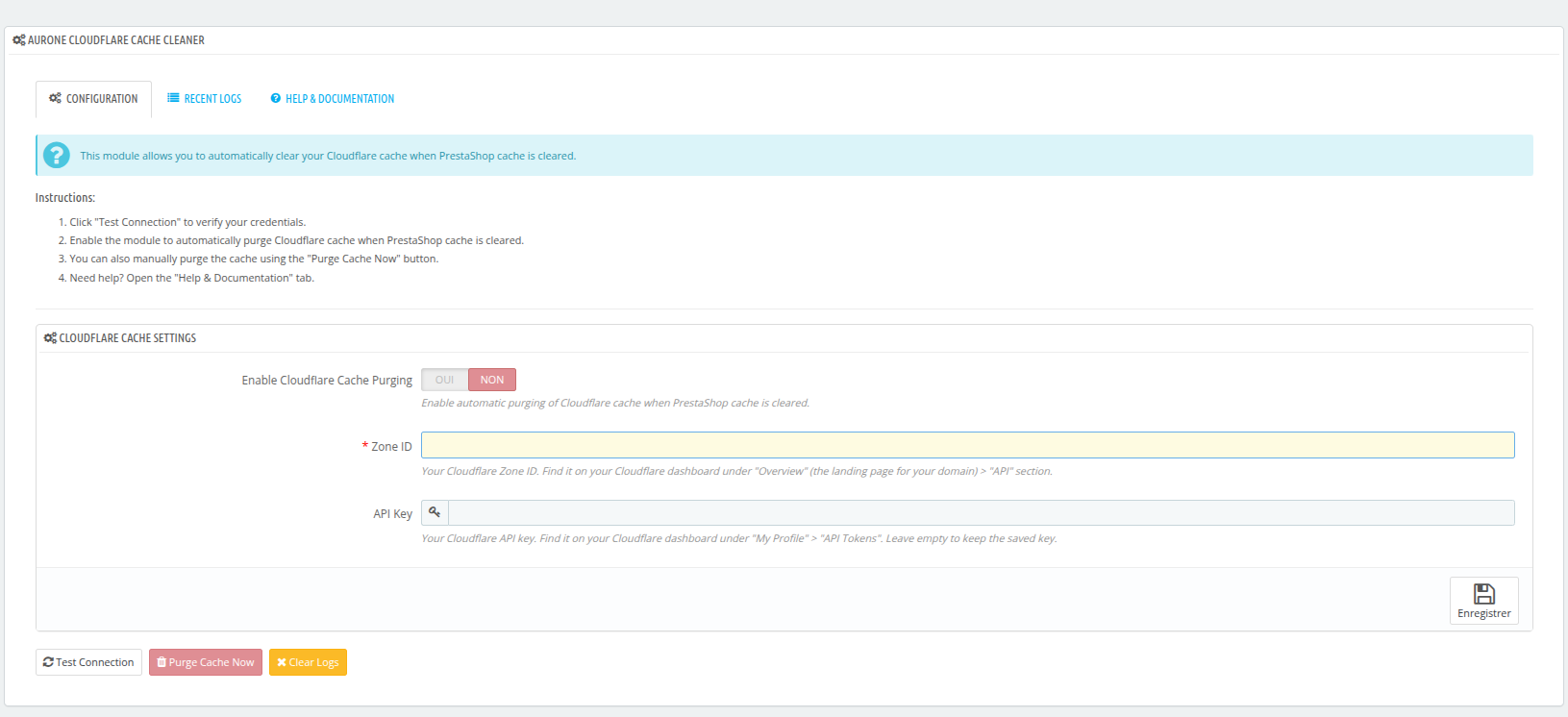
- 1-click manual purge and API connection test
- Readable activity log: clear messages with foldable technical details for support
- Abuse protection: maximum of 1 purge every 60 seconds
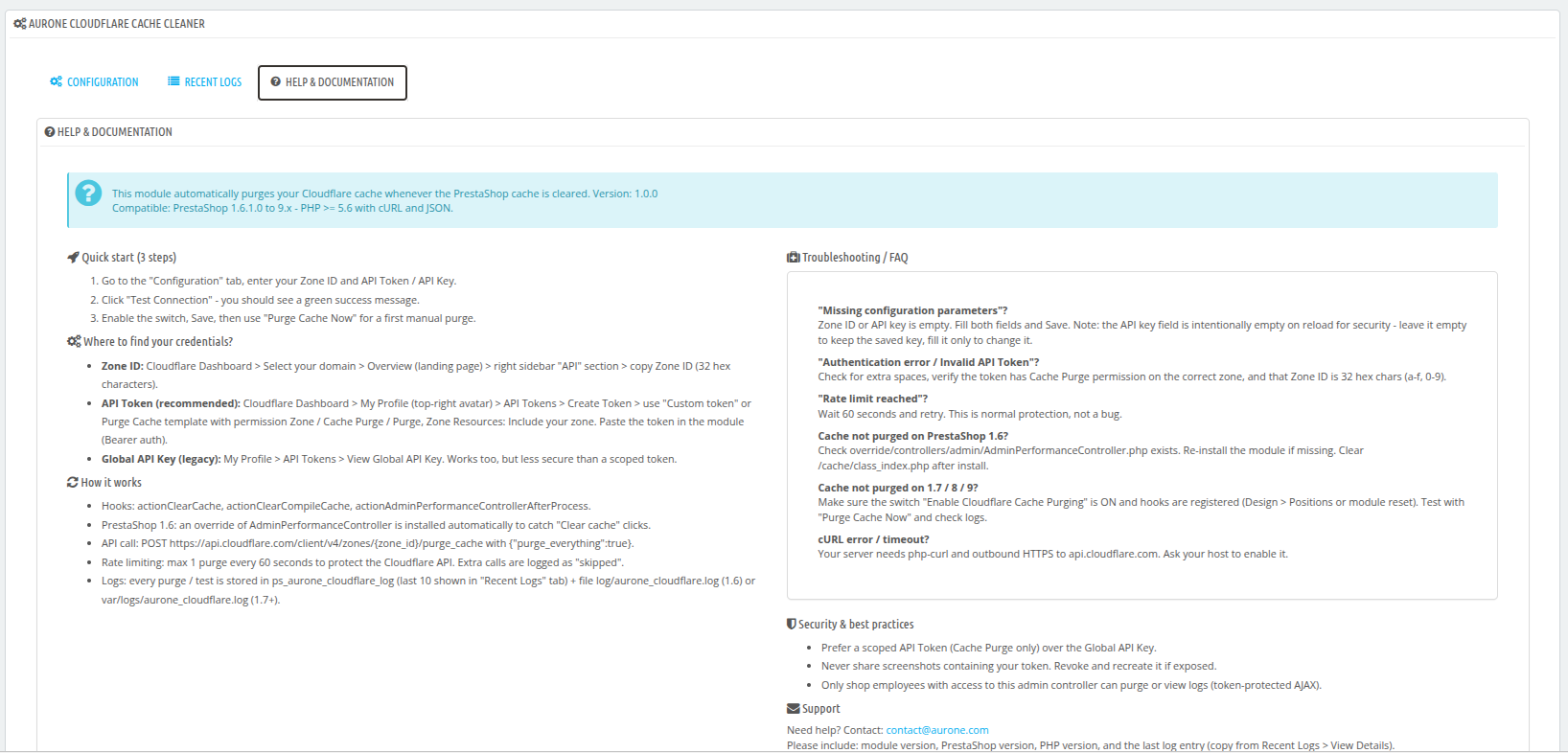
- Back-office with 3 tabs: Configuration, Latest logs, Help & Documentation
Compatibility
- PrestaShop 1.6.x, 1.7.x, 8.x and 9.x
- PHP 5.6 and higher, cURL and JSON extensions
- Compatible with free Cloudflare accounts
Installation
- Upload the
auronecloudflarecachefolder to/modules/and install the module - Paste your Zone ID and API token (from your Cloudflare dashboard)
- Click Test connection, enable, and save: you are online in 2 minutes
What’s included
- License for 1 store on PrestaShop
- 12 months of updates
- 12 months of support in English, French, Spanish, German, Italian, and Arabic
- Built-in help and documentation in the back-office
- Immediate download after payment
“Module + installation” option (+$10): our experts install the module on your store and do the basic configuration. You don’t have to do a thing.
Frequently asked questions
Do I need a paid Cloudflare subscription?
No. The module works perfectly with a free Cloudflare account. You simply need your Zone ID and an API token.
Does the module purge the entire cache or only specific pages?
It performs a complete purge of the PrestaShop Cloudflare cache for your domain, ensuring no outdated pages remain in memory.
Can frequent purges cause issues?
The module limits purges to one every 60 seconds, which prevents unnecessary calls to the Cloudflare API.
What does the “Module + installation” option include?
Our experts install the module on your PrestaShop store and do the basic configuration. After your order, we will contact you to arrange access to your store.
Can I use the module on multiple stores?
The license is valid for one store. To use it on another store, simply order an additional license.
What languages is support available in?
Our team provides support in English, French, Spanish, German, Italian, and Arabic.
What happens after 12 months?
The module will continue to work on your store. Only access to updates and support will expire.



Reviews
There are no reviews yet.